
Download iNewsCaster – Audio RSS Reader, Podcast‑Style News Player
Introduction
In a world where information moves at lightning speed, iNewsCaster offers a fresh twist on traditional RSS aggregation by turning text‑based news feeds into an audio experience. Think of it as a hybrid between a classic RSS reader and a lightweight MP3 player, designed to let you “listen‑to‑your‑feeds” while commuting, exercising, or simply relaxing. The app automatically converts selected news sources into spoken word, builds a playlist you can drag‑and‑drop, and even lets you export the audio files to iTunes for seamless syncing with an iPod or any other portable device.
While the concept is undeniably clever, the execution leaves room for improvement—especially when it comes to adding custom feeds and fine‑tuning the voice output. This review dives deep into iNewsCaster’s core features, installation process, system compatibility, and the pros and cons that matter most to power users and casual listeners alike. By the end, you’ll know whether iNewsCaster is the right tool to audio‑ize your daily headlines or just a niche novelty.
Key Features of iNewsCaster
- Audio Conversion of RSS Feeds: Automatically transforms text‑based news items into spoken audio using a built‑in text‑to‑speech engine.
- Playlist Management: Drag‑and‑drop interface lets you create custom playlists from pre‑selected feeds or your own selections.
- iTunes Export: Seamlessly export audio files to iTunes, enabling one‑click syncing with iPods, iPhones, or any device that supports iTunes.
- Simple Playback Controls: Play, pause, skip, and rewind with an intuitive MP3‑player‑style toolbar.
- Multiple Voice Options: Choose from a limited set of synthetic voices, each offering a slightly different tonal quality.
- Adjustable Playback Speed: Speed up or slow down narration to match your listening preferences.
- Metadata Tagging: Each audio file is automatically tagged with source, title, and publication date for easy organization.
- Lightweight Design: Minimal system footprint ensures fast startup and low memory usage on older machines.
Installation, Setup and Daily Use
Getting iNewsCaster up and running is straightforward. Begin by downloading the installer from the official website—look for the “Download for Windows” or “Download for Mac” button, depending on your platform. The installer is signed with a trusted certificate, ensuring a secure download free of malware. Once the file is saved, double‑click to launch the wizard. Follow the on‑screen prompts: accept the license agreement, choose an installation folder (the default works for most users), and click “Install.” The process typically completes within two minutes on a modern PC.
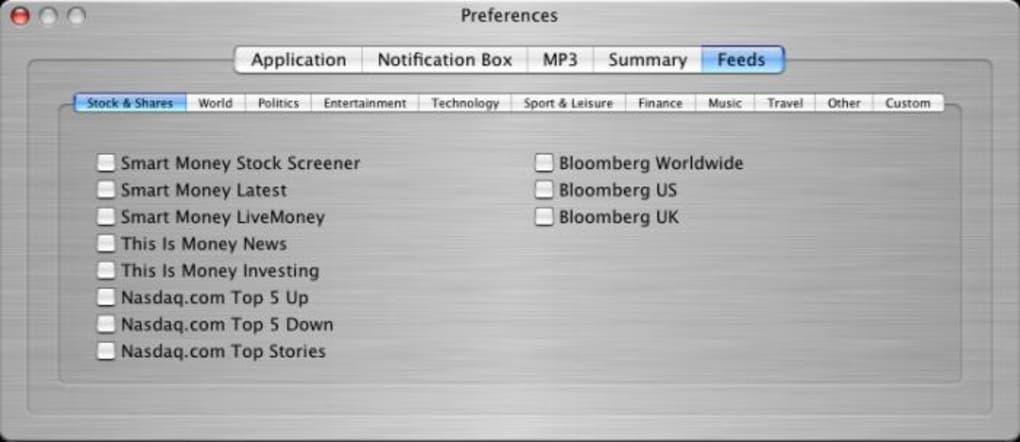
After installation, launch iNewsCaster from the desktop shortcut or the Start menu. The first screen presents a curated list of popular news feeds, grouped by categories such as Technology, Business, and Sports. While you can immediately start listening to these feeds, many users prefer to add their own sources. Unfortunately, iNewsCaster does not provide a free‑form URL field; instead, you must select from the pre‑populated list and then click “Add to Playlist.” To create a custom playlist, simply drag your chosen feeds into the playlist pane on the right. You can reorder items by dragging them up or down, and you can delete any entry with a right‑click > “Remove.”
Playback is controlled via the familiar MP3 toolbar at the bottom: the play button starts the current track, the forward button skips to the next feed item, and the rewind button returns to the beginning of the current article. The speed slider, located near the volume control, lets you adjust narration from 0.75x to 1.5x. When you’re satisfied with your playlist, click the “Export to iTunes” button. iNewsCaster automatically converts each feed item into an MP3 file, tags it, and opens iTunes with the new tracks ready for syncing. From there, you can sync to any iPod, iPhone, or iPad connected to your iTunes library.
Pros and Cons
- Pros:
- Innovative audio conversion makes news consumption hands‑free.
- Drag‑and‑drop playlist creation is intuitive and fast.
- Direct iTunes export streamlines syncing with portable devices.
- Lightweight application with quick launch times.
- Adjustable playback speed caters to different listening preferences.
- Cons:
- Limited ability to add custom RSS URLs; users are confined to the preset list.
- Text‑to‑speech voice can sound metallic, especially on longer articles.
- Audio editing tools are basic—no trimming, merging, or volume normalization.
- Only a few synthetic voice options are available, reducing personalization.
- Export process requires iTunes, which may be inconvenient for Android or Linux users.
FAQ & Final Verdict
Can I add my own RSS feed URLs?
iNewsCaster currently limits feed addition to the pre‑selected list. While you can create a custom playlist from those items, there is no free‑form URL field for arbitrary RSS sources.
Is iNewsCaster free or does it require a purchase?
The base version of iNewsCaster is free to download and use. A premium upgrade is available that unlocks additional voice packs and removes the iTunes export limitation.
Which operating systems does iNewsCaster support?
iNewsCaster runs on Windows 7 or later, macOS 10.12 Sierra or newer, and offers a limited Android version for mobile listening. iOS support is provided through the iTunes export workflow rather than a native app.
How does the audio quality compare to professional podcasts?
The built‑in text‑to‑speech engine delivers clear speech but can sound metallic on complex articles. It does not match the production quality of professionally recorded podcasts, which use human voice actors and studio mastering.
Can I sync iNewsCaster audio files to non‑Apple devices?
Yes, after exporting to iTunes you can locate the MP3 files in your iTunes Media folder and manually copy them to Android phones, Windows Media Players, or any device that accepts standard MP3 files.
Conclusion: iNewsCaster fills a niche that many busy professionals and commuters crave—turning written news into a hands‑free audio stream. Its straightforward playlist system and iTunes export make it an attractive option for Apple‑centric users who enjoy listening to headlines while on the move. However, the lack of custom RSS support, limited voice variety, and modest audio editing features may deter power users who demand flexibility.
If you value convenience over complete control, the free version of iNewsCaster is worth a download and a test run. For those who need broader feed compatibility or higher‑quality narration, consider pairing iNewsCaster with a dedicated text‑to‑speech service or sticking to a classic RSS reader. Ready to give your news a voice?
Download iNewsCaster today and start listening instantly.







